By: Intelligence Team, Kahng An
Recently, threat actors have been increasingly delivering malware or credential phishing attacks at the end of long email threads designed to exploit a potential victim’s trust in an email contact. In this tactic, threat actors deliver malicious payloads at the end of seemingly normal email conversations after gaining the potential victim’s trust. These kinds of attacks, also known as email thread hijacking, exploit the recipient’s trust in the sender after several legitimate emails. Often these are legitimate email threads that threat actors respond to when accessing compromised email accounts. However, they can also be email threads intentionally started by the threat actor. In these latter cases, the emails start off as seemingly harmless messages that are used to build trust with a potential victim before delivering a malicious threat. While Cofense Intelligence has been tracking these campaigns as response-themed emails, the actual malicious email at the end of the thread is usually similar to simpler meeting invitation, document, or shared file-themed emails. As such, properly trained and aware recipients should be able to spot these threats that are embedded at the end of a conversation. This report is a high-level overview of some recent response-themed emails and some common campaign patterns to be aware of.
Key Points
- Threat actors have been found delivering malware or credential phishing attacks as replies to email threads. These email replies can be found in both existing legitimate email threads and ones started by the threat actor.
- Cofense Intelligence tracks these campaigns as response-themed Active Threat Reports (ATR), which outline the campaign’s spoofed brands, subject lines, and resulting malicious payloads.
- Response-themed ATRs focus on IOCs (indicators of compromise) from the final malicious reply in an email thread.
- Response-themed emails can be difficult to filter against because they are found within email threads that contain mostly non-malicious messages. Traditional email security solutions may trust long threads of seemingly legitimate emails and fail to block the final malicious payload.
- Malware delivery was the predominant threat in Q1 2026 with 83.3% of response-themed ATRs being malware ATRs, but credential phishing was more prevalent in Q2 and Q3 2026 with 62.5% and 92.1% of total response-themed ATR volume in those quarters.
- While response-themed emails have been increasing in popularity this year, response-themed emails are not a completely new tactic. They were previously seen in similar volume in Q1 2024 though were rarely seen by Cofense Intelligence throughout all the latter half of 2024 and almost all of 2025.
What Are Response-Themed Emails?
Cofense Intelligence tracks response-themed emails as any malicious emails that appear to be, or actually are, a reply to an email thread. These kinds of threats are notable because the vast majority of malicious emails are messages that are not contained within a thread. By delivering malware or phishing sites within replies to an email thread, threat actors are able to abuse pre-established trust that was formed over a series of seemingly legitimate back-and-forth messages. The ultimate goal of response-themed email campaigns is to establish a higher level of trust with a potential victim over a series of message replies (or abuse already established trust from a pre-existing email thread) and betray that trust with a standard malicious email lure. In short, response-themed emails are not necessarily any different from the typical malicious email except for this additional abuse of trust and the amount of time the threat actor devotes to developing this trust.
While the concept may seem basic, response-themed emails tend to be rarer compared to most other email themes. This is largely because replying within email threads requires a threat actor to either opportunistically use an existing email chain within a compromised account or intentionally target potential victims with seemingly legitimate email correspondence. These factors lead response-themed campaigns to be rarer and generally more targeted. Figure 1 shows the frequency of response-themed ATRs from Q1 2024 to Q3 2026.
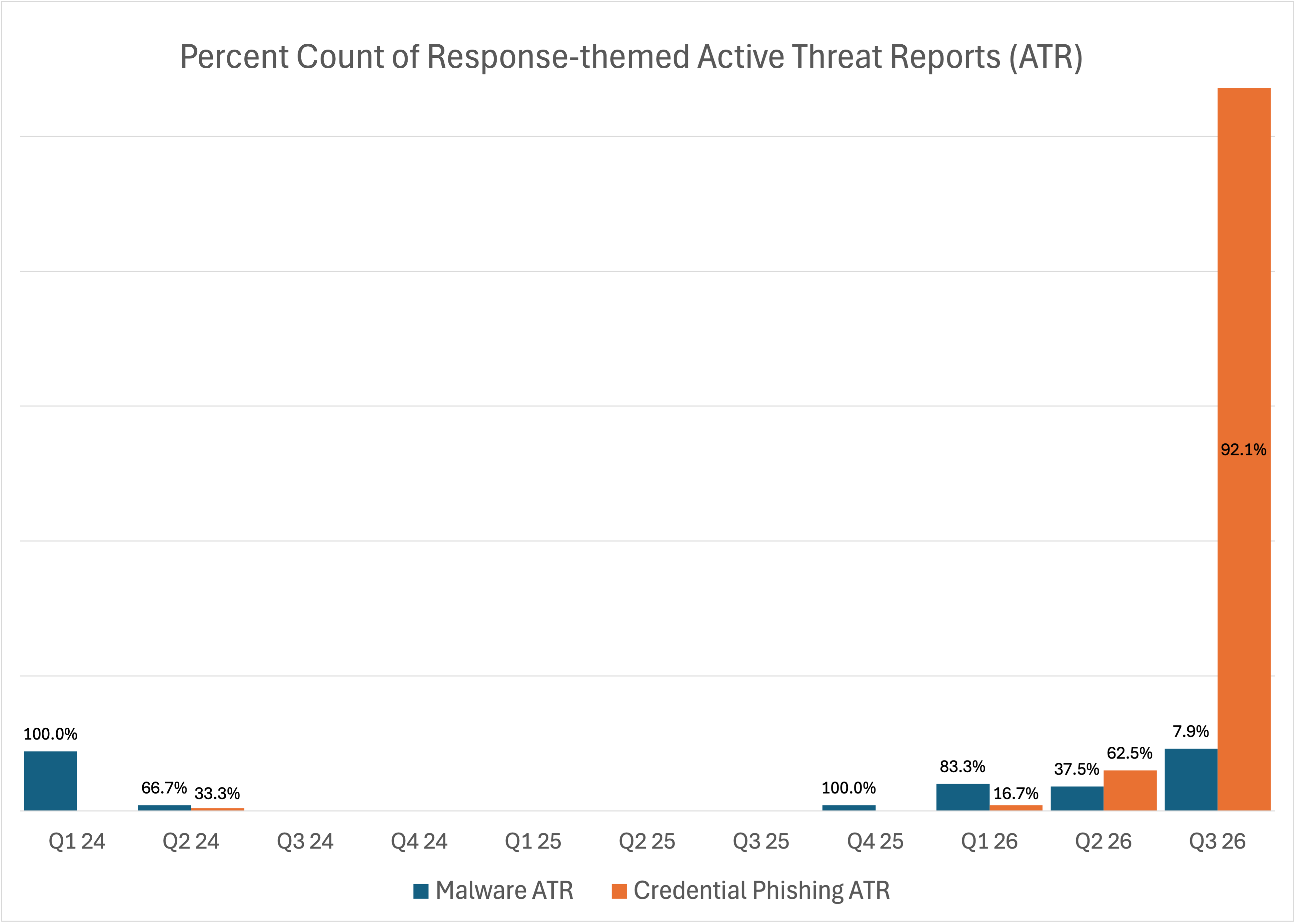
Figure 1: Frequency of response-themed ATRs from Q1 2024 to Q3 2026.
The recent volume of response-themed emails is not unprecedented. Q1 2024 saw a similar amount of total response-themed email campaign volume to what was seen in Q2 2026. However, the majority of campaign threats during this time were credential phishing attacks instead of malware delivery. Response-themed emails quickly plummeted in volume after Q1 2024 and were not seen in any substantial volume until Q1 2026. From there, the quarterly volume of response-themed malware ATRs has remained relatively stable until Q3 2026, while the amount of credential phishing ATRs has continuously skyrocketed in Q2 and Q3 2026.
Campaign Characteristics
Generally, response-themed emails are only distinguished by the fact that they are malicious emails within email threads. While these kinds of campaigns may be more deceptive than most due to the social engineering aspects of building trust over multiple legitimate interactions, the lures themselves still use many common techniques from other email themes. For example, Figure 2 shows a campaign that resulted in a response that sends a meeting invitation link that actually delivers GoTo RAT, a legitimate remote access tool that is a part of the LogMeIn management suite and is frequently abused by threat actors as a remote access trojan.
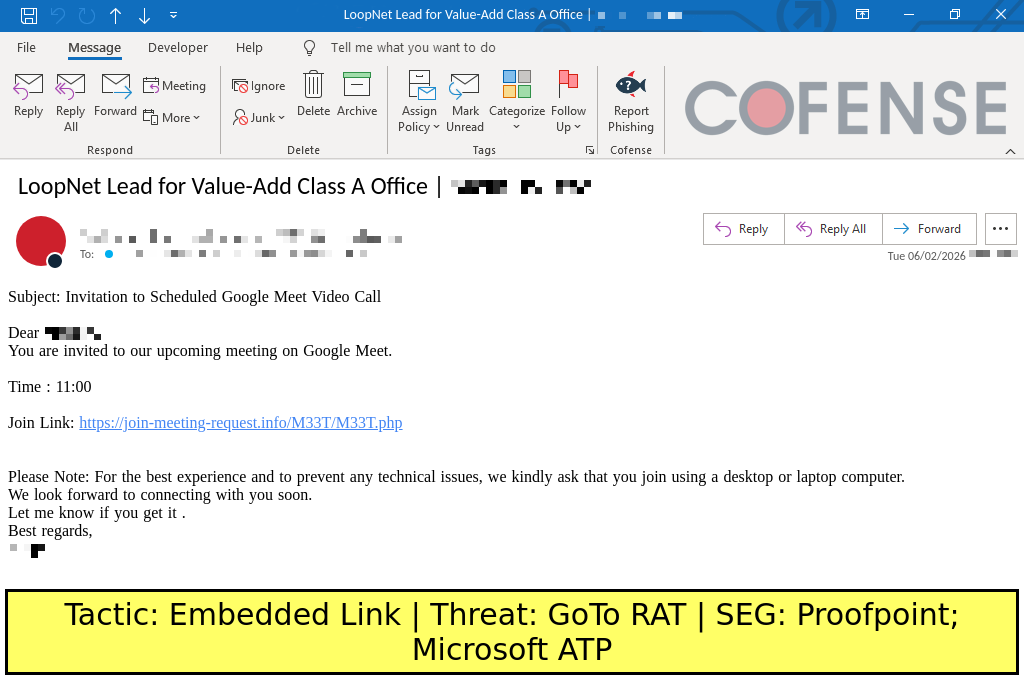
Figure 2: ATR 416570 contains a response to a long email thread with a sudden invitation to a meeting. However, the embedded link to the purported meeting site delivers GoTo RAT instead. This figure shows only the final reply, which contains the malicious link. The preceding thread has been omitted for length.
Similarly, message notification lures are also commonly seen within response-themed campaigns. Figure 3 shows a secure message notification-themed email that contains an embedded link to a purported message center. However, the site then requests verification to open the secure message by either accessing a Microsoft account credential phishing site or downloading ConnectWise RAT, a legitimate remote access tool also known as ConnectWise ScreenConnect that is currently one of the most frequently abused by threat actors as a remote access trojan.
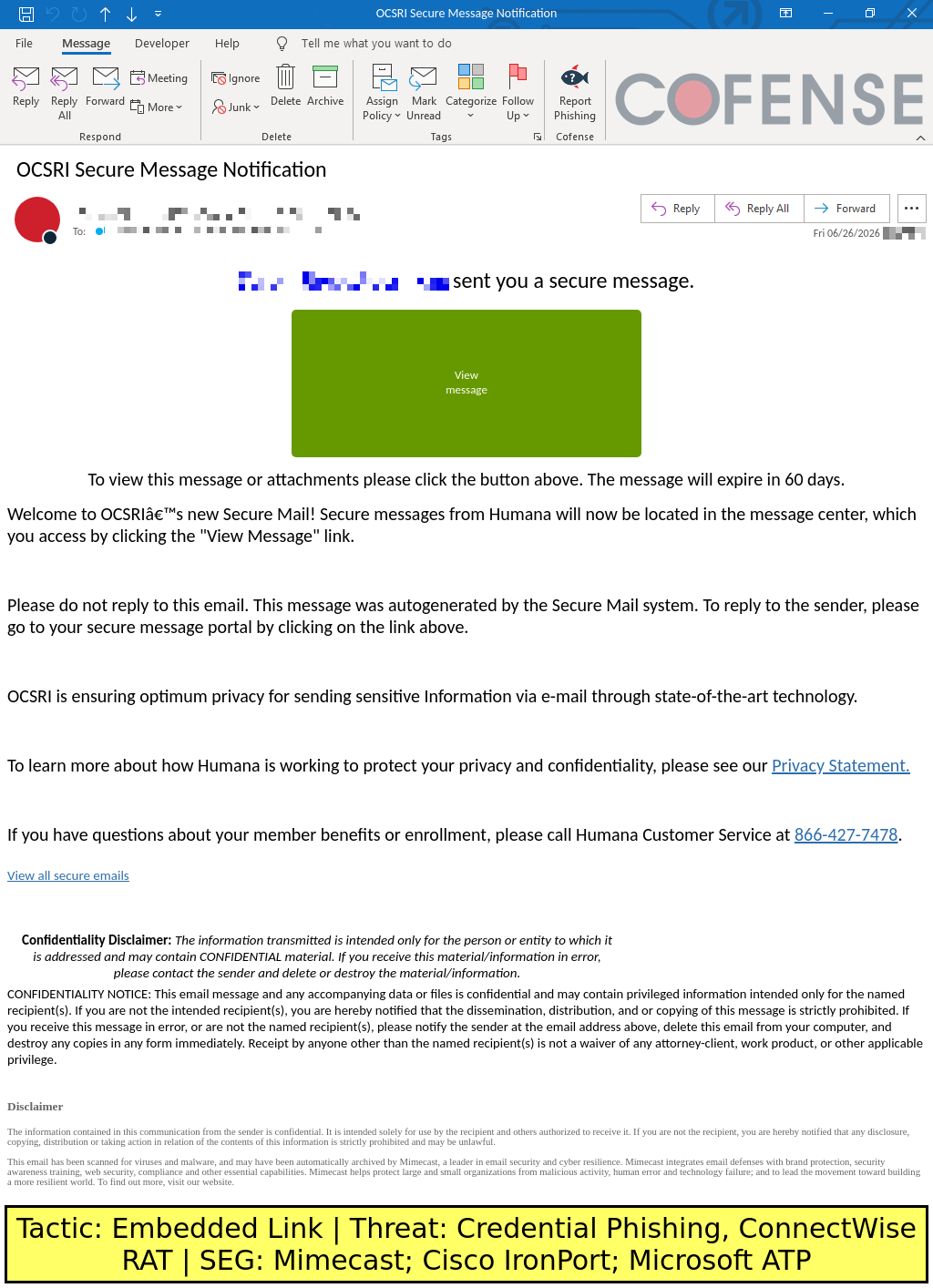
Figure 3: ATR 418145 contains a response to an email thread with a secure message notification. The embedded link directs to either a Microsoft-spoofing credential phishing site or a ConnectWise RAT download. This figure shows only the final reply, which contains the malicious link. The preceding thread has been omitted for length.
Conclusions
The cause for concern with these campaigns is not necessarily the malware or credential phishing payloads but the way the threat actors build up trust through legitimate emails. Response-themed emails, by their very nature of being within seemingly harmless email threads, seek to gain a potential victim’s trust through social engineering techniques. Compromised email accounts can be used to send links to supposed “important documents” that actually lead to a credential phishing attack. Threat actors can email a potential victim with harmless messages over the span of several hours or even days before attempting to send a “meeting invite” that downloads malware. In both of these cases, the threat actors are relying on betraying trust that was built up via an existing credible name or a series of seemingly normal interactions.
Thankfully, writing email replies still takes more effort from the threat actor than simply spamming out hundreds or thousands of similarly structured email templates across a list of victims. If written to a legitimate email chain, these would require access to a compromised email account that happens to have an email thread. The threat actor would then need to write a response with a hook that would be relevant to the thread (such as a meeting invitation). If the threat actor wants to start the email thread, then they would need to wait for a potential victim to respond and write replies to them. While email responses can be automated through generative AI solutions, allowing this campaign pattern to be scaled up to a broader potential attack surface, response-themed campaigns are generally limited to being highly targeted in nature, whether through opportunistically replying to existing threads in compromised email inboxes or creating new threads from scratch. These factors make response-themed emails rare compared to other campaign types.
For leadership, the core message is straightforward: a trusted sender and a familiar email thread are not necessarily proof that a message is safe. These kinds of attack patterns highlight the importance of carefully reading and assessing emails for potential threats, even within established email threads with known contacts. Any message within a thread may contain a malicious threat, so recipients should always stay aware of potentially manipulative messages that may be delivering unknown links, strange attachments, or other potential threats. A message that asks you to click a link, open an attachment, or log in deserves a second look no matter whose name is on it.
Mitigations
While traditional email security detections based off trusted senders, established contacts, and other known good signals may fail to filter these kinds of campaigns, email security solutions that continuously scan for suspect behavior and analyze malicious links and attachments in a sandbox environment may be the most reliable way of filtering these attacks. In particular, behavioral detections that flag sudden geographic shifts from the sender and potentially malicious requests may be better at handling this attack pattern.
Ultimately, the best defense against these kinds of attacks is training and awareness of potential email threats. While these campaigns feature their malicious payloads within email thread replies, they often include common phishing lures such as meeting invitations or documents that need to be reviewed. The only major difference is that response-themed emails can be more targeted and tailored to a potential victim based on responses within the thread and the amount of time involved in establishing and then exploiting trust. However, once the malicious email is sent, it will invariably be similar to what most malicious emails look like. With proper training and awareness of common email phishing techniques, recipients should be able to recognize potentially suspect emails. However, the real challenge is applying constant vigilance with familiar contacts or otherwise harmless emails. When receiving potentially malicious emails, consider validating the contents of the email out-of-band with the sender, especially if they are a known and trusted contact. While doing so, be sure to rely on contact information gathered from outside of the email itself because threat actors can also easily modify signature blocks as a part of their attack.
When developing better preventative measures against these attacks, consider implementing the following as a part of training and standard security operations:
- Update employee security awareness training to reflect how these campaigns actually arrive: as replies inside existing email threads, often from a known contact whose account has been compromised, ending in a meeting invitation, a shared document or file link, or a secure message notification. Employees trained on real, current threats are more likely to pause before clicking, even when the message comes from a familiar name. Simulation exercises should reproduce this exact pattern, a malicious reply within an ongoing thread, rather than outdated generic examples.
- Establish and enforce a software allowlist for remote access tools. Response-themed campaigns frequently deliver legitimate remote access tools that have been repurposed as malware, including ConnectWise RAT. Any remote access tool not on the approved list should be blocked from installing on corporate devices. Organizations without an allowlist should at minimum block the digital certificates associated with remote access tools they do not use.
- Deploy enterprise password managers. When an employee follows a malicious reply to a credential phishing page, the password manager will refuse to fill credentials because the domain does not match the legitimate service. This gives a structural catch that works no matter how convincing the branding or how trusted the thread appears, and it complements employee training rather than replacing it.
- Deploy email security that looks for behavioral anomalies inside otherwise trusted threads, rather than relying on sender reputation alone. Because these emails often come from legitimate or compromised accounts, the sending domain is frequently valid, so brand and domain mismatch checks catch little. Signals that do help include a known sender suddenly sending from an unusual location, or a long-running thread that abruptly introduces a link or attachment.
- Use tools and software provided by Cofense such as Triage and Vision to prevent initial access and stop follow-on attacks. Triage gives security teams an in-depth breakdown of a reported phishing email, which makes a malicious reply buried in a legitimate thread easier to analyze and act on. Vision uses human insight and AI precision to quarantine and remove malicious emails from inboxes, including messages that reached users from a trusted or compromised sender.
- Give employees a simple, one-click way to report suspicious emails, which is exactly what Cofense Triage and Vision are built for. Because these campaigns often target multiple recipients from the same infrastructure, an employee who reports a suspicious reply quickly gives security teams the chance to block that infrastructure before others click. A well-trained employee who flags a response-themed email is a detection tool no automated system can replicate.